11 mins read
The Complete Guide to YouTube Audio Quality and MP3 Files
A complete starting point for understanding source quality, MP3 settings, file size, compatibility, safe browsing, and responsible use.
Read article

Welcome to Ytmp3, a browser-based YouTube downloader and MP3/MP4 converter that lets you find a video, request conversion and save the resulting file. Enter music keywords and press Search to see matching results, then use a result's Download button to reach its conversion choices. A recognized YouTube Link opens the converter directly instead. Choose MP3 for listening or MP4 for watching, with quality settings determined by the selected source and conversion service.





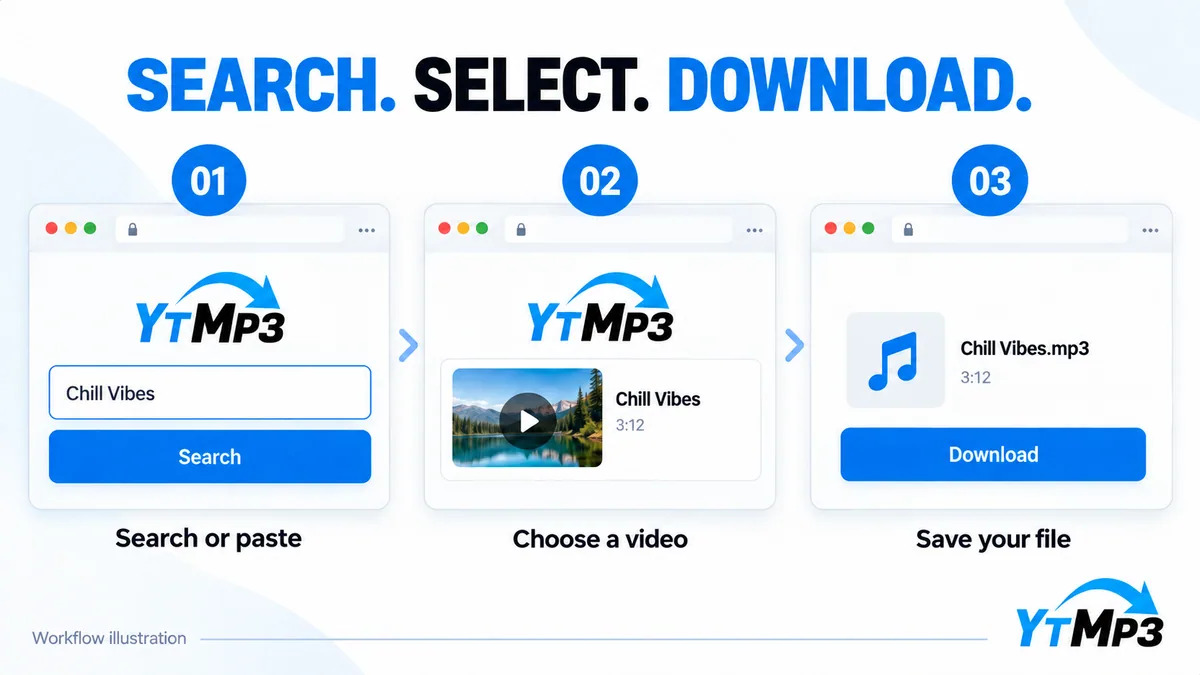
Enter an artist and song name, then select Search to find candidates. If you already have the video's address, paste the YouTube Link to reach its converter without searching.
Compare the uploader and duration as well as the title before pressing Download beside a result. For a pasted YouTube Link, confirm that the converter identifies the video you meant to select.
Choose MP3 or MP4 and an available quality, then press Convert. Download the prepared file when offered; processing a video and transferring its file to your device are separate stages.
MP3 is useful when you want to build a listening collection without storing the accompanying video. Before using the YouTube MP3 Downloader, consider whether the selected version includes long introductions or sections that only make sense on screen. Choosing the right source matters more than selecting the largest file, particularly when you plan to listen to it repeatedly.
The Ytmp3 Converter may offer MP3 at 320kbps, 256kbps and 128kbps, depending on the source video and conversion service. At equal duration, 128kbps generally needs less storage, while 256kbps and 320kbps allow a higher bitrate. Compare the choices actually offered for your video; increasing the bitrate cannot restore detail that the source never contained.
Choose MP4 when following the video is part of the experience, rather than an optional addition to the music or spoken explanation. Resolution choices can include HD at 1080p and 720p, plus 480p, 360p, 240p and 144p. MP4 resolution availability depends on the source video and conversion service; it is separate from the availability of MP3 bitrates.
Start with the smallest details you need to see, such as captions or notes on a slide. Lower resolutions can make those details difficult to distinguish, even on a small screen. A higher offered resolution may help preserve source detail but cannot recreate missing detail. Consider duration too: a long MP4 can occupy substantial space even at a moderate resolution.
If you cannot find a download, inspect the browser's download history before requesting another copy. Open the completed entry or its folder shortcut when available, and check the destination configured in browser settings. Android commonly exposes saved files through a file manager, while iPhone uses Files; a chosen folder can differ from the default Downloads location.
When a saved file will not play, first establish whether the transfer finished. An interrupted download needs attention to the transfer, not necessarily another conversion. For a completed file, confirm that the player accepts its MP3 or MP4 format and note any error message. Changing a filename extension does not repair incomplete data or convert the file into another format.
Recognized YouTube Links for individual videos take you directly to conversion choices. Address recognition alone does not guarantee that the video remains available or that conversion can finish.
youtube.com/watch?v=VIDEO_IDyoutu.be/VIDEO_IDyoutube.com/shorts/VIDEO_IDm.youtube.com/watch?v=VIDEO_IDyoutube.com/embed/VIDEO_IDYtmp3 works in a browser without a separate installation, but third-party downloads can introduce risks. Treat requests for passwords, browser extensions or unexpected installers as reasons to stop. Keep browser security protections enabled, and inspect the downloaded file's type before opening it: an MP3 or MP4 request should not require running an unfamiliar program. Never share account passwords to continue a download.
For an invalid YouTube URL, copy the address from the individual video's page and check for missing characters or pasted commentary. If the video itself cannot be accessed, stop with that source. A recognized video followed by failed MP3 conversion is a different problem: the conversion service may be busy. Wait briefly and retry once, then return later if it fails again. If processing finishes but downloading stalls, check your connection, free storage and browser transfer status. Resolve any identified issue before making one further download attempt rather than restarting conversion repeatedly.
Disclaimer: Ytmp3 is an independently operated YouTube downloader and converter. It is not affiliated with, endorsed by, or sponsored by YouTube or Google. YouTube and related names belong to their respective owners. References to those services describe compatible links and do not imply an official partnership.
Download only content that you own or have permission to save. Follow the applicable licence conditions, including attribution where required, as well as copyright law and YouTube's Terms of Service. Personal or non-commercial use does not automatically grant permission to copy or redistribute someone else's content.
Download Tips for Video Selection, Quality Settings and Saved Files
Check the video's duration and uploader before committing space to a download, especially when several versions share a title. Pick a bitrate or resolution that fits how you will use the file rather than choosing the highest number by habit. After saving, open its location from the browser and use a descriptive filename without changing the extension.
Ytmp3 connects browser-based video selection with MP3 or MP4 conversion choices. Keywords produce search results, while a recognized YouTube Link opens conversion directly. Its YouTube MP3 Converter option prepares a listening file; you then download the prepared file through your browser.
Paste the YouTube Link into the search field, confirm the selected video and choose MP3. Select one of the offered bitrates, request conversion and save the prepared file. Wait for the browser transfer to finish before moving or opening your download.
Ytmp3 is free to use: its website search, conversion request and download workflow require no payment. Free access does not determine which videos can be processed or which quality choices appear; those depend on the source and conversion service.
No separate application installation is needed; use the website in your browser. The browser also handles saving the prepared file. An unrelated software installation request is not a necessary conversion step, so close that request rather than running an unfamiliar installer.
You can use Ytmp3 through a browser on Android and iPhone. Saving controls and folder destinations vary by browser settings. On Android, check your file manager; on iPhone, check Files and the browser's downloads list to locate a completed transfer.
MP3 choices may include 320kbps, 256kbps and 128kbps, with availability depending on the source video and conversion service. A higher bitrate generally increases file size for the same duration. It cannot recover missing source detail, so select a setting that suits your storage and listening needs.
Select MP4 in the converter when it is offered for your chosen video, then choose an available resolution. MP4 retains the visual content as well as sound. The source and conversion service determine the resolution choices, so another video may offer a different selection.
Check that the link identifies one video and was copied in full without surrounding text. Copy it again from the video's page if needed. If that video is unavailable or cannot be accessed, stop; a correctly formed address does not make an inaccessible source usable.
A conversion service can be busy even after it recognizes the video. Give it a short pause, retry once and leave further attempts until later if the failure continues. If conversion completed, check connection and storage problems instead of treating a failed transfer as failed processing.
Use browser protections and avoid unexpected executable files, extensions or installation prompts. Never share passwords to obtain a download. Check that the saved file matches the format requested, and remember that third-party downloads can introduce risks despite requiring no separate converter installation.
No YouTube account or sign-in is needed for this website workflow. You can begin with music keywords or a YouTube Link. Keep account credentials private; a request for your password is not part of obtaining an MP3 or MP4 through Ytmp3.
You need copyright permission or another valid rights basis, compliance with applicable law in your jurisdiction, and consideration of YouTube terms. These are separate requirements. Personal use alone does not establish permission; confirm that authorization covers downloading and whatever you intend to do with the file.
11 mins read
A complete starting point for understanding source quality, MP3 settings, file size, compatibility, safe browsing, and responsible use.
Read article7 mins read
A listening focused method for selecting bitrate without assuming that the largest number is always the most useful choice.
Read article7 mins read
Use a short sequence of checks to separate link problems, access limits, network interruptions, browser issues, and storage failures.
Read article6 mins read
A calm, repeatable checklist for evaluating a page before you paste a link, grant access, or open a downloaded file.
Read article© 2026 Ytmp3